











September 25th, 2026
SUSE Virtualization is a cloud native hyperconverged infrastructure platform solution optimized for running virtual machine and container workloads in the data center, multi-cloud and edge environments.
This article focuses on tuning Windows VM performance on SUSE Virtualization since Windows guests often need a little more care to reach their full potential. You can find the most impactful parameters to tune for Windows performance and the results.
Windows VM in SUSE Virtualization
SUSE Virtualization uses KubeVirt as the virtualization layer to manage virtual machines on Kubernetes. For instructions on creating and running Windows VMs on SUSE Virtualization, refer to the document Running Windows VMs on SUSE Virtualization. After creating a Windows VM, apply the tuning recommendations described in this document to optimize performance.
Drivers for the Windows VM
Windows is a popular guest OS for virtual machines, but it needs specific drivers to identify the block device, such as VirtIO/VirtIO SCSI. SUSE provides the VMDP (Virtual Machine Driver Pack for Microsoft Windows) for the Windows VM. For more details about how to install the driver, check the Installation Guide for VMDP.
Factors that affect Windows VM performance
There are several factors that can affect the performance of a Windows VM on SUSE Virtualization. Some of the most common ones include the choice of disk drivers, the CPU model, Hyper-V enlightenments and IOThreads. By tuning these parameters, you can significantly improve the performance of your Windows VM.
DISK Drivers
The most common disk driver for Windows VM is either VirtIO or VirtIO SCSI. The VirtIO driver is a paravirtualized driver that provides better performance. The VirtIO SCSI driver is used for the hotplug device. It can also perform well after tuning.
Here is the corresponding spec snippet for the disk device in the VM spec:
// For SCSI driver
devices:
- disk:
bus: scsi
name: vol001
// For VirtIO driver
devices:
- disk:
bus: virtio
name: vol001
We can see results for both drivers in the following table:
Performance
| Test Item | SCSI | VirtIO |
|---|---|---|
| Seq Write 128K | 551.5 MB/s | 544.0 MB/s |
| Seq Read 128K | 1,397.6 MB/s | 1,422.1 MB/s |
| Rand Write 4K | 28,240 IOPS | 45,226 IOPS |
| Rand Read 4K | 31,093 IOPS | 36,296 IOPS |
| Rand Mix 4K (60R/40W) | 29,479 IOPS | 37,672 IOPS |
Latency
| Test Item | SCSI | VirtIO |
|---|---|---|
| Seq Write 128K | 232.06 ms | 235.28 ms |
| Seq Read 128K | 91.55 ms | 90.00 ms |
| Rand Write 4K | 31.46 ms | 22.61 ms |
| Rand Read 4K | 30.55 ms | 28.19 ms |
| Rand Mix 4K (60R/40W) | 31.16 ms | 27.16 ms |
CPU Model
For the CPU model, we recommend the host-passthrough mode for optimal performance. This mode allows the VM to see the same CPU features as the host, which can improve performance for certain workloads.
Hyper-V enlightenments
Hyper-V enlightenments are a set of features that allow Windows to run more efficiently on a hypervisor. Enabling these features can improve performance by allowing Windows to better utilize the underlying hardware. KubeVirt also supports a set of Hyper-V enlightenments that can be enabled in the VM spec. Check the official document for more details.
Here is an example spec snippet for enabling Hyper-V enlightenments in the VM spec:
domain:
clock:
timer:
hyperv: {}
features:
hyperv:
ipi: {}
relaxed: {}
reset: {}
runtime: {}
spinlocks:
spinlocks: 8191
synic: {}
synictimer: {}
vapic: {}
vpindex: {}
You can use “edit yaml” in the UI to edit the VM spec and add the above snippet to enable Hyper-V enlightenments. See the screenshot below for the UI operation:


Performance
| Test Item | SCSI | SCSI + Hyper-V enlightenments | VirtIO | VirtIO + Hyper-V enlightenments |
|---|---|---|---|---|
| Seq Write 128K | 551.5 MB/s | 564.4 MB/s | 544.0 MB/s | 557.2 MB/s |
| Seq Read 128K | 1,397.6 MB/s | 1,430.8 MB/s | 1,422.1 MB/s | 1,419.3 MB/s |
| Rand Write 4K | 28,240 IOPS | 43,618 IOPS | 45,226 IOPS | 44,206 IOPS |
| Rand Read 4K | 31,093 IOPS | 36,694 IOPS | 36,296 IOPS | 36,627 IOPS |
| Rand Mix 4K (60R/40W) | 29,479 IOPS | 38,231 IOPS | 37,672 IOPS | 37,996 IOPS |
Latency
| Test Item | SCSI | SCSI + Hyper-V enlightenments | VirtIO | VirtIO + Hyper-V enlightenments |
|---|---|---|---|---|
| Seq Write 128K | 232.06 ms | 226.78 ms | 235.28 ms | 229.70 ms |
| Seq Read 128K | 91.55 ms | 89.45 ms | 90.00 ms | 90.18 ms |
| Rand Write 4K | 31.46 ms | 23.47 ms | 22.61 ms | 23.16 ms |
| Rand Read 4K | 30.55 ms | 27.90 ms | 28.19 ms | 27.95 ms |
| Rand Mix 4K (60R/40W) | 31.16 ms | 26.78 ms | 27.16 ms | 26.95 ms |
IOThreads and MultiQueue
You can only use IOThreads with VirtIO. The SCSI device would be done with a SCSI controller, but currently, Kubevirt doesn’t support IOThreads for the SCSI controller.
IOThreads can improve performance for I/O intensive workloads by dedicating a thread to handle I/O operations. Kubevirt supports various IOThread Policies. Check the official document for more details.
In this article, we recommend using the supplementalPool policy and enabling Block Multi-Queue for better performance.
Here is an example spec snippet for enabling IOThreads and MultiQueue in the VM spec:
spec:
domain:
ioThreadsPolicy: supplementalPool
ioThreads:
supplementalPoolThreadCount: 4
devices:
- disk:
bus: virtio
multiQueue: true
name: vol001
Performance
| Test Item | VirtIO + Hyper-V enlightenments | VirtIO + Hyper-V enlightenments + SupplementalPool |
|---|---|---|
| Seq Write 128K | 557.2 MB/s | 563.2 MB/s |
| Seq Read 128K | 1,419.3 MB/s | 1,428.7 MB/s |
| Rand Write 4K | 44,206 IOPS | 43,397 IOPS |
| Rand Read 4K | 36,627 IOPS | 37,006 IOPS |
| Rand Mix 4K (60R/40W) | 37,996 IOPS | 38,236 IOPS |
Latency
| Test Item | VirtIO + Hyper-V enlightenments | VirtIO + Hyper-V enlightenments + SupplementalPool |
|---|---|---|
| Seq Write 128K | 229.70 ms | 227.28 ms |
| Seq Read 128K | 90.18 ms | 89.59 ms |
| Rand Write 4K | 23.16 ms | 23.59 ms |
| Rand Read 4K | 27.95 ms | 27.67 ms |
| Rand Mix 4K (60R/40W) | 26.95 ms | 26.78 ms |
Why didn’t we see a significant performance improvement after enabling IOThreads and MultiQueue? Because this test scenario has only one disk and no other disks to contend for the IOThread, the performance improvement is not significant. For scenarios with multiple disks, the performance improvement should be more noticeable.
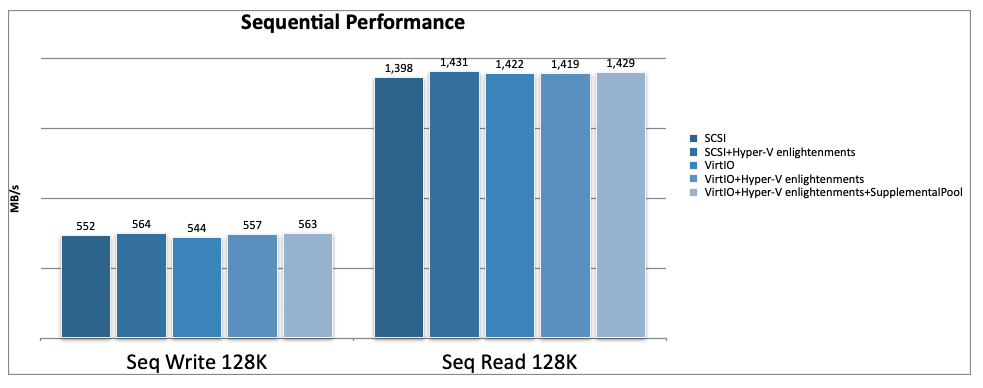
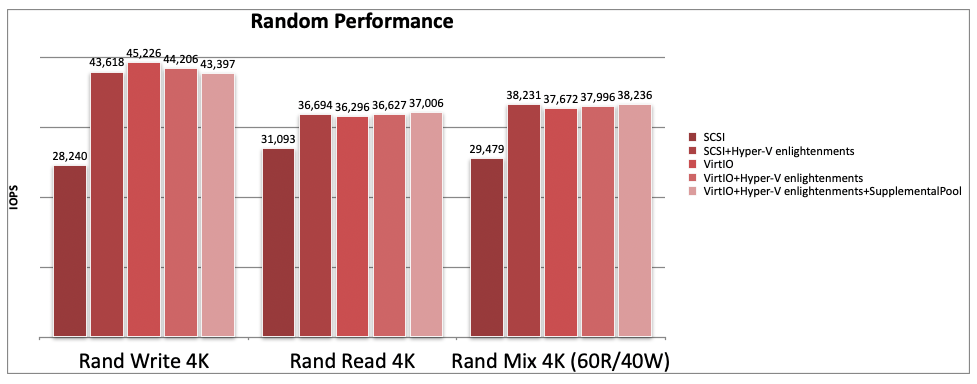
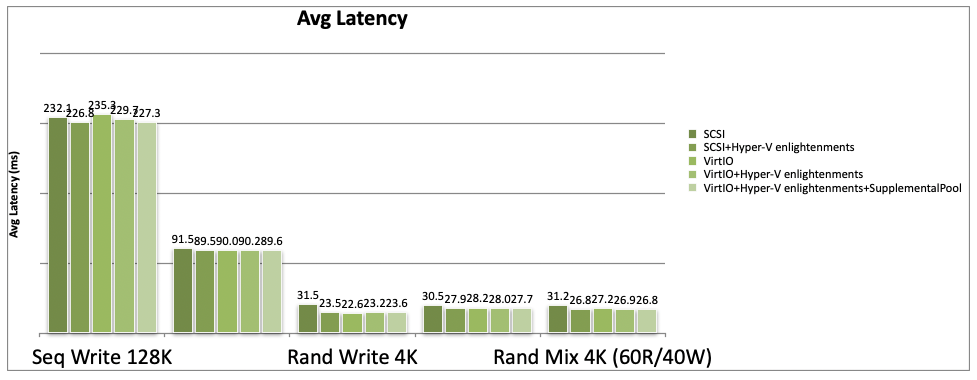
Summary of the performance result:
Conclusion
The results show that choosing the right disk driver, enabling Hyper-V enlightenments, and using IOThreads can significantly improve the performance of a Windows VM on SUSE Virtualization. VirtIO and VirtIO SCSI give similar results once tuned. For multiple disks, VirtIO works better because it supports IOThreads and MultiQueue, offering higher performance. We recommend using VirtIO as the disk driver for Windows VMs on SUSE Virtualization and enabling Hyper-V enlightenments and IOThreads for best performance.
So, the following two combinations would be the best practice for the Windows VM performance tuning on SUSE Virtualization:
- VirtIO SCSI + Hyper-V enlightenments
- VirtIO + Hyper-V enlightenments + IOThreads
Appendix: Test Environment and Tool
Benchmark Tools: DISKSPD v2.2
Windows Version: Windows Server 2022
SUSE Virtualization Version: SUSE Virtualization 1.8.0
Kubevirt Version: Kubevirt 1.7.0
Longhorn Version: Longhorn v1.11.1
CPU: INTEL(R) XEON(R) SILVER 4509Y
SSD: VK000960KYDPT 960GB NVMe SSD
Related Articles

Vicente Cheng
Experienced in distributed (storage) systems such as Ceph, Longhorn. Mainly focus on Kubernetes storage functionality now.