Empowering the Linux Admin: Rapid Rollbacks now Default in SLES 16 on AWS
Introduction
SUSE Linux Enterprise Server has been a staple on Amazon EC2 for over 15 years. With the launch of SLES 16 this past November, we’ve introduced a change that, on the surface, might seem like a minor technical detail: switching the default root filesystem to Btrfs.
While a new filesystem isn’t usually the highlight of a release, this change specifically addresses a practical challenge for AWS administrators: how to recover a system quickly when something goes wrong.
Although Btrfs has been the default for our on-premises SLES products since 2018, our Public Cloud images previously retained XFS, but with SLES 16 we now follow the standard SUSE default setup.
What is BTRFS?
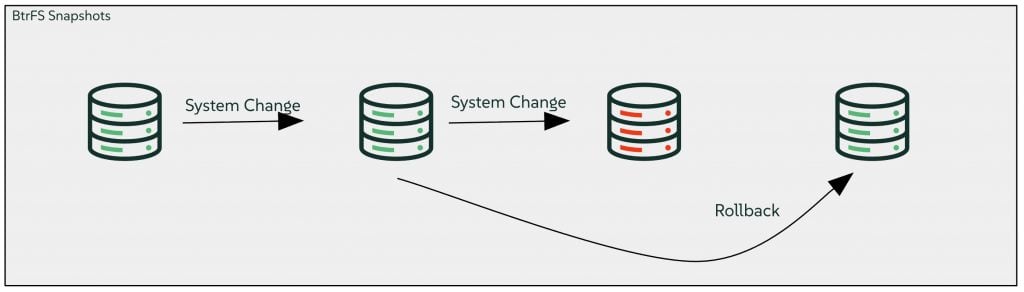
Btrfs (usually pronounced as “Butter FS”) is a Copy-on-Write (CoW) file system for Linux. When data is modified, Btrfs doesn’t overwrite the old data. Instead, it writes the new data to an available block and updates the pointers to the data. Because of CoW architecture and supporting software, you can take a “snapshot” of your entire system nearly instantaneously. It takes up almost no space initially because it just points to the existing data. It’s only as the system is used over time that the snapshot begins to consume space by retaining the old snapshot data.
And the key value is that with the availability to take snapshots, comes the ability to provide rollbacks.
What is a rollback?
As you would expect, a rollback returns your root filesystem to a previous state. On AWS, we often see customers taking snapshots of the boot disk using the Elastic Block Storage Service (EBS). To be clear: Btrfs snapshots are not a replacement for EBS snapshots.
AWS EBS Snapshots are a managed block-level backup service stored in Amazon S3 (these are independent of the EBS Volume). They act more like a traditional “off-site” insurance policy and are a critical part of any backup and Disaster Recovery (DR) strategy.
In which case, where does a Btrfs snapshot fit in? By having the ability to snap and restore the root volume locally, the rollback process stays entirely within the hands of the Linux Administrator. You can restore the OS without having to involve the cloud admins or worry about restoring from backup archives and cloud snapshots if things go wrong.
Practical Scenarios
There are three specific scenarios where local rollbacks save the day:
The Failed Update: We’ve all been there: a package update or application install fails, leaving the system in an inconsistent state. Instead of spending hours unpicking files and configuration changes, you simply roll back to the state just before the event.
The ‘Oh-no’ Moment: If a configuration file is accidentally deleted or incorrectly updated, you could go hunting through documentation or backup archives. Or, you could use Btrfs to compare the current file against a snapshot from five minutes ago and fix it instantly.
Safe Experimentation: Snapshots and rollbacks also allow users to make experimental system changes and performance tweaks knowing that if anything breaks, they can roll back in seconds rather than spending hours troubleshooting or redeploying the instance.
Using Btrfs and Snapper in AWS
The first requirement is to install SLES 16 from one of the SUSE curated AMIs, these are available in the general catalog and the AWS Marketplace.
When deploying the instance, it’s essential to ensure that the size of the root filesystem is greater than 16GB – snapshots will not work on anything smaller. When deploying SLES on AWS, the default is to have a 10GB root disk so make sure this is modified at creation time.
Once up and running, you will need to install the snapper package and dependencies as they are not installed and configured on our images by default and are required to handle the snapshotting and rollback activity:
sudo zypper in snapper
At this point, it is important to refer to the SUSE Documentation for details on how to configure snapper, and manage snapshots and most importantly the many features of managing a snapshot lifecycle.
Snapper Cheatsheet
Once snapper is configured, here are some example commands to snap, view and rollback the OS.
Manually take a snapshot:
sudo snapper -c root create --description "Before changing config"
List the available snapshots:
sudo snapper list
And if needed, perform the rollback:
sudo snapper rollback [ID]
reboot
Next Steps
So that’s it. With SLES 16 now live on AWS, you have a powerful new tool for OS-level resilience. If you’re a Linux administrator running workloads on AWS, I encourage you to look at the new images and see how local rollbacks might fit into your existing workflow.
From there, you can begin experimenting with manual snapshots or configure automated policies to match your specific needs. Whether it saves you from an ‘oh-no’ configuration error or helps you test a complex update with total confidence, we think you’ll find it a valuable addition to your SUSE on AWS toolkit.
Further information
SUSE Documentation
https://documentation.suse.com/sles/16.0/html/SLES-snapper-basics/index.html
SUSE Linux on the AWS Marketplace
https://aws.amazon.com/marketplace/pp/prodview-aunaaxggt6gpe
Related Articles