How vGPU passthrough works in SUSE Virtualization
SUSE Virtualization is for running virtual machines, whether they are legacy applications, cloud-native workloads, or a combination of the two.
SUSE Virtualization has supported PCIDevice passthrough to VM workloads since v1.1.x
vGPU support was added with v1.3.x, with MIG-backed vGPU Devices added in v1.7.x
How device passthrough works in SUSE Virtualization
All device passthrough types depend on the PCIDevices addon.
Once the addon is enabled, a daemonset is deployed to all nodes in the cluster.
The pcidevices controller scans the underlying host system pci bus and creates the following custom resources:
PCIDevicecustom resource for each PCI device found on the PCI busSRIOVNetworkDevicecustom resource for each network card that is not part of the mgmt bond interface and supports network VFsSRIOVGPUDevicecustom resource for each NVIDIA GPU that supports SR-IOV-backed vGPUsUSBDevicecustom resource for each attached USB devicevGPUDevicecustom resource for each vGPU deviceMIGConfigurationcustom resource for eachSRIOVGPUDevicesupporting MIG-backed vGPU devices
The pcidevices controller also runs a device plugin that allows advertising the various devices to the kubelet.
PCIDevice passthrough
When a user enables a PCIDevice passthrough via the Harvester UI
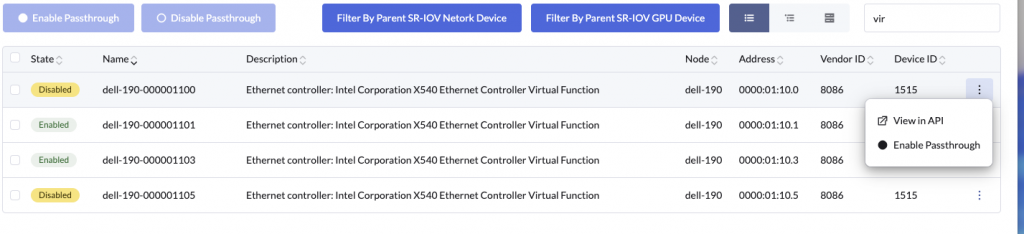
A PCIDeviceClaim object is created
apiVersion: devices.harvesterhci.io/v1beta1
kind: PCIDeviceClaim
metadata:
  creationTimestamp: "2026-04-23T01:16:17Z"
  finalizers:
  - wrangler.cattle.io/PCIDeviceClaimOnRemove
  generation: 1
  name: dell-190-000001100
  ownerReferences:
  - apiVersion: devices.harvesterhci.io/v1beta1
    kind: PCIDevice
    name: dell-190-000001100
    uid: 57566bac-3116-4c41-9176-da5f69cbb418
  resourceVersion: "72468493"
  uid: 14163b00-5d71-4dcf-ae91-cd3d452bc12d
spec:
  address: "0000:01:10.0"
  nodeName: dell-190
  userName: admin
status:
  kernelDriverToUnbind: ixgbevf
  passthroughEnabled: true
The PCIDeviceClaim name corresponds to the the associated PCIDevice object.
In this case the related PCIDevice is
apiVersion: devices.harvesterhci.io/v1beta1
kind: PCIDevice
metadata:
  annotations:
    harvesterhci.io/pcideviceDriver: ixgbevf
  creationTimestamp: "2026-03-04T09:50:40Z"
  generation: 1
  labels:
    harvesterhci.io/parent-sriov-network-device: dell-190-eno1
    nodename: dell-190
  name: dell-190-000001100
  resourceVersion: "72468491"
  uid: 57566bac-3116-4c41-9176-da5f69cbb418
spec: {}
status:
  address: "0000:01:10.0"
  classId: "0200"
  description: 'Ethernet controller: Intel Corporation X540 Ethernet Controller Virtual
    Function'
  deviceId: "1515"
  iommuGroup: "111"
  kernelDriverInUse: vfio-pci
  nodeName: dell-190
  resourceName: intel.com/X540_ETHERNET_CONTROLLER_VIRTUAL_FUNCTION
  vendorId: "8086"
As part of enabling the PCIDevice the controller performs the following operations
- Checks if the
PCIDevicehas a validiommuGroup - Identifies if there any other
PCIDeviceobjects which share the sameiommuGroup. If additional devices are found, say in case of commercial GPU’s which may have an audio port, then additionalPCIDeviceClaimobjects are created for relatedPCIDeviceobjects - The controller binds the
iommuGroupfrom thePCIDevicetovfiodriver. The binding ofiommuGrouptovfiodriver makes it essential that all devices in theiommuGroupare passed through to the VM. - The controller starts a device plugin matching the
resourceNamefield. In case multiple devices use the sameresourceNamethey will share the device plugin - The device plugin advertises the number of devices available to the
kubeletvia the PCI device plugin framework. The available devices can be viewed under the nodestatus.capacityandstatus.allocatablecpu: 30900m devices.kubevirt.io/kvm: 1k devices.kubevirt.io/tun: 1k devices.kubevirt.io/vhost-net: 1k ephemeral-storage: "1891143242089" hugepages-1Gi: "0" hugepages-2Mi: "0" intel.com/X540_ETHERNET_CONTROLLER_VIRTUAL_FUNCTION: "3" kubevirt.io/dell-190-0624-0251-001004: "0" memory: 230848340Ki nvidia.com/GRID_A100-1-5C: "2" pods: "200" - The controller also updates kubevirt CR’s list of permitted devices
- The controller continues to watch and reconcile the listed devices availability on the host, and keeps updating the health of the same via the device plugin. This ensures the node
status.spec.allocatablealways reports healthy devices on the node.
Now that the devices have been setup for usage via Kubevirt and K8s, we can now consume them with our VM workloads.
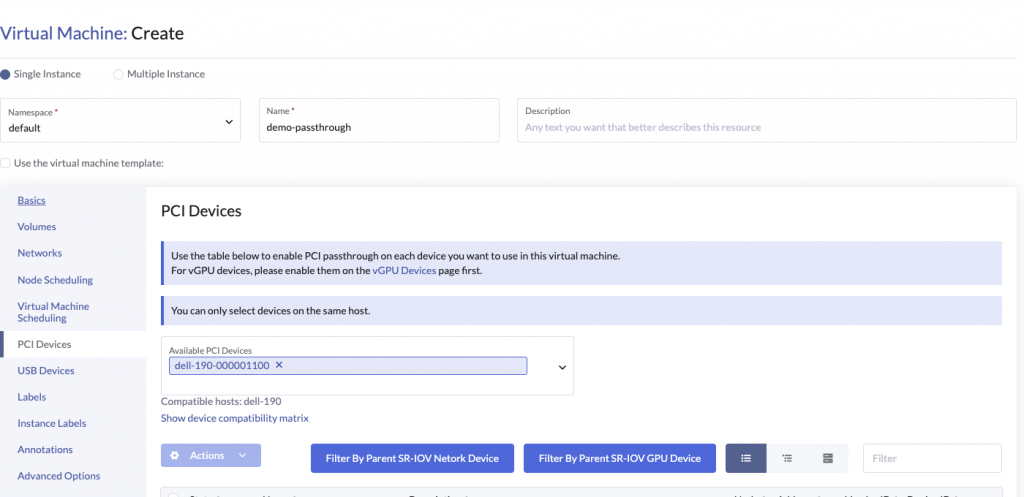
The hostDevices section in the VM spec looks as follows
      domain:
        cpu:
          cores: 2
          maxSockets: 1
          sockets: 1
          threads: 1
        devices:
          disks:
          - bootOrder: 1
            disk:
              bus: virtio
            name: disk-0
          - disk:
              bus: virtio
            name: cloudinitdisk
          hostDevices:
          - deviceName: intel.com/X540_ETHERNET_CONTROLLER_VIRTUAL_FUNCTION
            name: dell-190-000001100
Kubevirt takes the deviceName field and generates a virt-launcher pod with the pod requesting the specific deviceName as part of the resources requests / limit section.
    name: compute
    resources:
      limits:
        cpu: "2"
        devices.kubevirt.io/kvm: "1"
        devices.kubevirt.io/tun: "1"
        devices.kubevirt.io/vhost-net: "1"
        intel.com/X540_ETHERNET_CONTROLLER_VIRTUAL_FUNCTION: "1"
        memory: "6352273705"
      requests:
        cpu: 125m
        devices.kubevirt.io/kvm: "1"
        devices.kubevirt.io/tun: "1"
        devices.kubevirt.io/vhost-net: "1"
        ephemeral-storage: 50M
        intel.com/X540_ETHERNET_CONTROLLER_VIRTUAL_FUNCTION: "1"
        memory: "6352273705"
K8s uses the resource request/limits requirements to schedule the pod to a node which advertises the resource intel.com/X540_ETHERNET_CONTROLLER_VIRTUAL_FUNCTION
This allows the VM to be schedule to one of the nodes supporting the PCIDevice
There is still the small matter of the virt-launcher pod discovering the pcidevice address to generate the appropriate hostdev section in the libvirt domain
    <hostdev mode='subsystem' type='pci' managed='no'>
      <driver name='vfio'/>
      <source>
        <address domain='0x0000' bus='0x01' slot='0x10' function='0x0'/>
      </source>
      <alias name='ua-hostdevice-dell-190-000001100'/>
      <address type='pci' domain='0x0000' bus='0x0f' slot='0x00' function='0x0'/>
    </hostdev>
This is accomplished by a combination of kubelet, pcidevice controller device plugin and kubevirt.
The flow is as follows:
- virt-launcher pod is scheduled to the node
- kubelet sends an
Allocaterequest - pcidevice controller device plugin returns an
AllocateResponse. The response contains kubevirt hostdevice specific environment variables. In this specific case the response contains an env variable set to the address of the actual PCIDevicePCI_RESOURCE_INTEL_COM_X540_ETHERNET_CONTROLLER_VIRTUAL_FUNCTION=0000:01:10.0 - kubelet injects the additional device plugin response during container creation (this can be verified by running
envinside the virt-launcher pod) - virt-launcher pod on boot checks vmi spec, and checks if any
hostDevicesare needed. If found, it parses the env variable to identify variables with prefixPCI_RESOURCEand builds an internal reference of available device variables. - virt-launcher maps the
hostDevicesto the associatedPCI_RESOURCEprefixed environment variable, and extracts the pci addresses available from the device plugin as part of theAllocateResponse - virt-launcher uses the pci addresses to generate the associated
hostdevsection in libvirt domain which references the underlying pcidevice in thesourceaddress
With all this plumbing sorted, the VM is able to boot and access the underlying host device
vGPUDevice passthrough
vGPUDevice passthrough leverages Kubevirt and Linux mediated devices capability.
Users can manage vGPU Devices via Harvester
The pcidevices controller leverages the NVIDIA drivers to do the heavy lifting. These need to be setup via the NVIDIA Driver toolkit.
The pcidevice controller manages vGPUDevices in a way which is quite similar to PCIDevices but with a few minor differences.
When a user enables a vGPUDevice with a specific profile
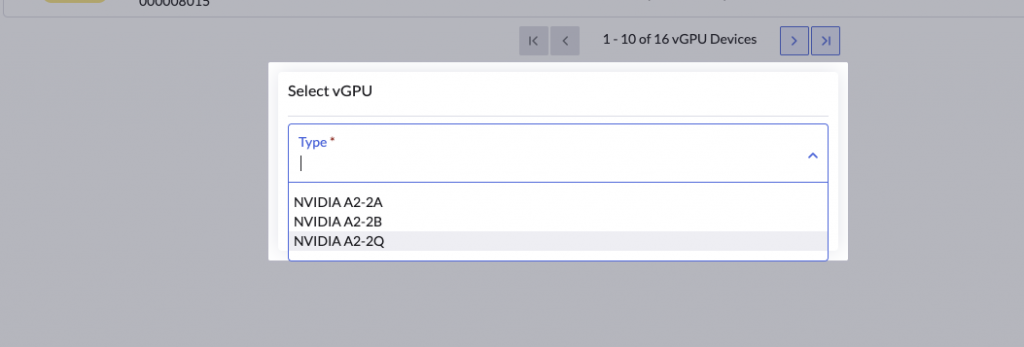
The vGPUDevice object is updated to specify the vGPUTypeName
apiVersion: devices.harvesterhci.io/v1beta1
kind: VGPUDevice
metadata:
  creationTimestamp: "2026-04-23T02:02:13Z"
  generation: 2
  labels:
    harvesterhci.io/parentSRIOVGPUDevice: hp-130-tink-system-000008000
    nodename: hp-130-tink-system
  name: hp-130-tink-system-000008004
  resourceVersion: "392310"
  uid: 660aceb5-ce0d-481f-8fa7-3678f1f4d3d1
spec:
  address: "0000:08:00.4"
  enabled: true
  nodeName: hp-130-tink-system
  parentGPUDeviceAddress: "0000:08:00.0"
  vGPUTypeName: NVIDIA A2-2Q
status:
  configureVGPUTypeName: NVIDIA A2-2Q
  uuid: aa8d831f-7752-4d32-9f62-d4a95b118e28
  vGPUStatus: vGPUConfigured
As part of setting up the vGPUDevice the pcidevices controller will perform the following actions:
- Lookup the nvidia gpu type from the list of
status.availableTypesstatus: availableTypes: NVIDIA A2-2A: nvidia-750 NVIDIA A2-2B: nvidia-743 NVIDIA A2-2Q: nvidia-745 - Generates a
uuidfor the vGPU - In our case we have used a vGPU of type
NVIDIA A2-2Q, the pcidevices controller will write theuuidto
/sys/class/mdev_bus/0000:08:00.4/mdev_supported_types/nvidia-745/create - The nvidia driver will setup the associated vGPU and advertise it in
/sys/bus/mdev/devices
 ls -l /sys/bus/mdev/devices
total 0
lrwxrwxrwx. 1 root root 0 Apr 23 02:05 0558c582-5856-4b16-a95d-bd0b40786e76 -> ../../../devices/pci0000:00/0000:00:03.0/0000:08:00.7/0558c582-5856-4b16-a95d-bd0b40786e76
lrwxrwxrwx. 1 root root 0 Apr 23 02:05 41295fb2-1eaf-4567-af2c-fdc0a3bbf40d -> ../../../devices/pci0000:00/0000:00:03.0/0000:08:01.2/41295fb2-1eaf-4567-af2c-fdc0a3bbf40d
lrwxrwxrwx. 1 root root 0 Apr 23 02:05 4aac4be2-2d88-46e0-8287-982ac0b298ba -> ../../../devices/pci0000:00/0000:00:03.0/0000:08:01.3/4aac4be2-2d88-46e0-8287-982ac0b298ba
lrwxrwxrwx. 1 root root 0 Apr 23 02:05 4e8d7e63-3546-4d53-866b-8b13e87ca344 -> ../../../devices/pci0000:00/0000:00:03.0/0000:08:00.6/4e8d7e63-3546-4d53-866b-8b13e87ca344
lrwxrwxrwx. 1 root root 0 Apr 23 02:05 561c3f51-096b-42fb-8d21-809ef3a1585a -> ../../../devices/pci0000:00/0000:00:03.0/0000:08:01.1/561c3f51-096b-42fb-8d21-809ef3a1585a
lrwxrwxrwx. 1 root root 0 Apr 23 02:05 79c0e662-5fd3-4246-b919-1318133d09c8 -> ../../../devices/pci0000:00/0000:00:03.0/0000:08:01.0/79c0e662-5fd3-4246-b919-1318133d09c8
lrwxrwxrwx. 1 root root 0 Apr 23 02:35 aa8d831f-7752-4d32-9f62-d4a95b118e28 -> ../../../devices/pci0000:00/0000:00:03.0/0000:08:00.4/aa8d831f-7752-4d32-9f62-d4a95b118e28- The pcidevices controller will check if a device plugin matching the GPU profile already exists. If not it will setup a vGPU device plugin matching the GPU profile, which advertises the NVIDIA vGPU profile to the node
cpu: 22940m
devices.kubevirt.io/kvm: 1k
devices.kubevirt.io/tun: 1k
devices.kubevirt.io/vhost-net: 1k
ephemeral-storage: "149527126718"
hugepages-1Gi: "0"
hugepages-2Mi: "0"
memory: 131860768Ki
nvidia.com/NVIDIA_A2-2A: "4"
nvidia.com/NVIDIA_A2-2B: "2"
nvidia.com/NVIDIA_A2-2Q: "1"
pods: "200"- The controller updates the mediated devices section in kubevirt CR
- The controller continues to watch and reconcile the vGPU devices availability on the host, and keeps updating the health of the same via the device plugin. This ensures the node
status.spec.allocatablealways reports healthy devices on the node.
Now that the vGPU device has been setup for usage via Kubevirt and K8s, we can now consume them with our VM workloads.
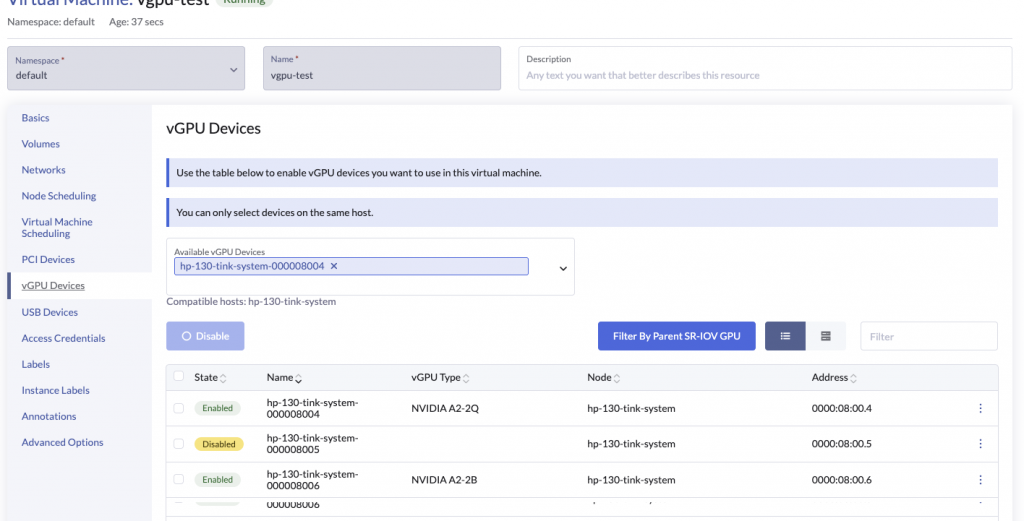
The GPUs section in the VM spec looks as follows
      domain:
        cpu:
          cores: 2
          maxSockets: 1
          sockets: 1
          threads: 1
        devices:
          disks:
          - bootOrder: 1
            disk:
              bus: virtio
            name: disk-0
          - disk:
              bus: virtio
            name: cloudinitdisk
          gpus:
          - deviceName: nvidia.com/NVIDIA_A2-2Q
            name: hp-130-tink-system-000008004
Kubevirt takes the deviceName field and generates a virt-launcher pod with the pod requesting the specific deviceName as part of the resources requests / limit section.
    name: compute
    resources:
      limits:
        cpu: "2"
        devices.kubevirt.io/kvm: "1"
        devices.kubevirt.io/tun: "1"
        devices.kubevirt.io/vhost-net: "1"
        nvidia.com/NVIDIA_A2-2Q: "1"
        memory: "6352273705"
      requests:
        cpu: 125m
        devices.kubevirt.io/kvm: "1"
        devices.kubevirt.io/tun: "1"
        devices.kubevirt.io/vhost-net: "1"
        ephemeral-storage: 50M
        nvidia.com/NVIDIA_A2-2Q: "1"
        memory: "6352273705"
K8s uses the resource request/limits requirements to schedule the pod to a node which advertises the resource nvidia.com/NVIDIA_A2-2Q
This allows the VM to be schedule to one of the nodes supporting the vGPU profile
There is still the small matter of the virt-launcher pod discovering the vgpu address to generate the appropriate hostdev section in the libvirt domain
    <hostdev mode='subsystem' type='mdev' managed='no' model='vfio-pci' display='on' ramfb='on'>
      <source>
        <address uuid='aa8d831f-7752-4d32-9f62-d4a95b118e28'/>
      </source>
      <alias name='ua-gpu-hp-130-tink-system-000008004'/>
      <address type='pci' domain='0x0000' bus='0x10' slot='0x00' function='0x0'/>
    </hostdev>
This is accomplished by a combination of kubelet, pcidevice controller device plugin and kubevirt.
The flow is as follows:
- virt-launcher pod is scheduled to the node
- kubelet sends an
Allocaterequest * pcidevice controller device plugin returns anAllocateResponse. The respose contains kubevirt hostdevice specific environment variables. In this specific case the response contains an env variable set to the uuid of the vGPU device
MDEV_PCI_RESOURCE_NVIDIA_COM_NVIDIA_A2-2Q=aa8d831f-7752-4d32-9f62-d4a95b118e28- kubelet injects the additional device plugin response during container creation (this can be verified by running
envinside the virt-launcher pod) - virt-launcher pod on boot checks vmi spec, and checks if any
gpusare needed. If found, it parses the env variable to identify variables with prefixMDEV_PCI_RESOURCEand builds an internal reference of variables devices available. - virt-launcher maps the
gpusto the associatedMDEV_PCI_RESOURCEprefixed environment variable, and extracts the uuid available from the device plugin as part of theAllocateResponse - virt-launcher uses the uuid to generate the associated
hostdevsection in libvirt domain which references the underlying pcidevice in thesourceaddress
With all this plumbing sorted, the VM is able to boot and access the underlying vGPU device
Changes to vGPU Device passthrough in Harvester 1.8.x
Harvester v1.8.x will use the linux kernel 6.12.x which introduces changes to the mdev / vfio framework.
As a result of this there are changes in the NVIDIA KVM/AI drivers
Due to these changes the vGPUs are no longer managed via uuid and mediated devices route.
Instead they are managed more like traditional PCIDevices with a few minor changes
- The vGPU device VF is not bound to the
vfiodriver - The pcidevice device controller advertises the dynamically configured vGPU profile via the pci device plugin framework
This looks as follows in Harvester:
- The user enables the vGPU device with a profile

apiVersion: devices.harvesterhci.io/v1beta1
kind: VGPUDevice
metadata:
  creationTimestamp: "2026-03-17T22:46:57Z"
  generation: 2
  labels:
    harvesterhci.io/parentSRIOVGPUDevice: dell-190-000004000
    nodename: dell-190
  name: dell-190-000004006
  resourceVersion: "72598850"
  uid: f9152156-e4a1-424f-91c3-eda4e7dd5933
spec:
  address: "0000:04:00.6"
  enabled: true
  nodeName: dell-190
  parentGPUDeviceAddress: "0000:04:00.0"
  vGPUTypeName: GRID A100-1-5C
status:
  configureVGPUTypeName: GRID A100-1-5C
  uuid: "474"
vGPUStatus: vGPUConfigured- The pcidevices controller looks up the vgpu profile id from the list of
status.availableTypes - The pcidevices controller writes the
idto/sys/bus/pci/devices/0000:04:00.6/nvidia/current_vgpu_typeand the nvidia driver configures the vgpu profile on the specific device - The pcidevices controller sets up a pcideviceclaim for the associate pcidevice backing the vGPU device
apiVersion: devices.harvesterhci.io/v1beta1
kind: PCIDeviceClaim
metadata:
  annotations:
    pcidevice.harvesterhci.io/override-resource-name: nvidia.com/GRID_A100-1-5C
    pcidevices.harvesterhci.io/skip-vfio-binding: "true"
  creationTimestamp: "2026-04-23T03:57:12Z"
  finalizers:
  - wrangler.cattle.io/PCIDeviceClaimOnRemove
  generation: 1
  labels:
    harvesterhci.io/parentSRIOVGPUDevice: dell-190-000004000
  name: dell-190-000004006
  ownerReferences:
  - apiVersion: devices.harvesterhci.io/v1beta1
    kind: PCIDevice
    name: dell-190-000004006
    uid: 925f21d6-87e9-4a52-8182-f60b033104f9
  - apiVersion: devices.harvesterhci.io/v1beta1
    kind: VGPUDevice
    name: dell-190-000004006
    uid: f9152156-e4a1-424f-91c3-eda4e7dd5933
  resourceVersion: "72598853"
  uid: b5117717-5beb-4935-90c0-944a526a923b
spec:
  address: "0000:04:00.6"
  nodeName: dell-190
  userName: admin
status:
  kernelDriverToUnbind: nvidia
passthroughEnabled: true- The pcidevice controller uses the vGPU profile to update the
status.resourceNamefield on the correspondingPCIDevice
apiVersion: devices.harvesterhci.io/v1beta1
kind: PCIDevice
metadata:
  annotations:
    harvesterhci.io/pcideviceDriver: nvidia
    pcidevice.harvesterhci.io/override-resource-name: nvidia.com/GRID_A100-1-5C
  creationTimestamp: "2026-04-23T03:45:00Z"
  generation: 1
  labels:
    harvesterhci.io/parentSRIOVGPUDevice: dell-190-000004000
    nodename: dell-190
  name: dell-190-000004006
  resourceVersion: "72598816"
  uid: 925f21d6-87e9-4a52-8182-f60b033104f9
spec: {}
status:
  address: "0000:04:00.6"
  classId: "0302"
  description: '3D controller: NVIDIA Corporation GA100 [A100 PCIe 40GB]'
  deviceId: 20f1
  iommuGroup: "117"
  kernelDriverInUse: nvidia
  nodeName: dell-190
  resourceName: nvidia.com/GRID_A100-1-5C
vendorId: 10de- In case of pcidevices related to a vGPU, the pcidevice controller no longer binds the vGPU to vfio device as the vGPU needs to continue using the nvidia driver
- As part of the new vGPU setup workflow, the pcidevices controller will use the pci device plugin framework to advertise the vGPU to the kubelet. As a result of this change the
AllocateResponsereturns pci device addresses and not uuid’s, with changes to the corresponding env variable prefix. The vGPU is advertised via thePCI_RESOURCEprefix and as opposed to the earlierMDEV_PCI_RESOURCEprefix.
cpu: 30900m
devices.kubevirt.io/kvm: 1k
devices.kubevirt.io/tun: 1k
devices.kubevirt.io/vhost-net: 1k
ephemeral-storage: "1891143242089"
hugepages-1Gi: "0"
hugepages-2Mi: "0"
intel.com/X540_ETHERNET_CONTROLLER_VIRTUAL_FUNCTION: "3"
kubevirt.io/dell-190-0624-0251-001004: "0"
memory: 230848352Ki
nvidia.com/GRID_A100-1-5C: "3"
pods: "200"- The controller also updates kubevirt CR’s list of permitted devices
As we can see with beginning with Harvester v1.8.x, vGPU devices are managed and advertised by the backend as traditional hostDevices, with the minor difference that they are no longer bound to vfio driver.
The vGPU devices are consumed from Harvester as traditional PCIDevices 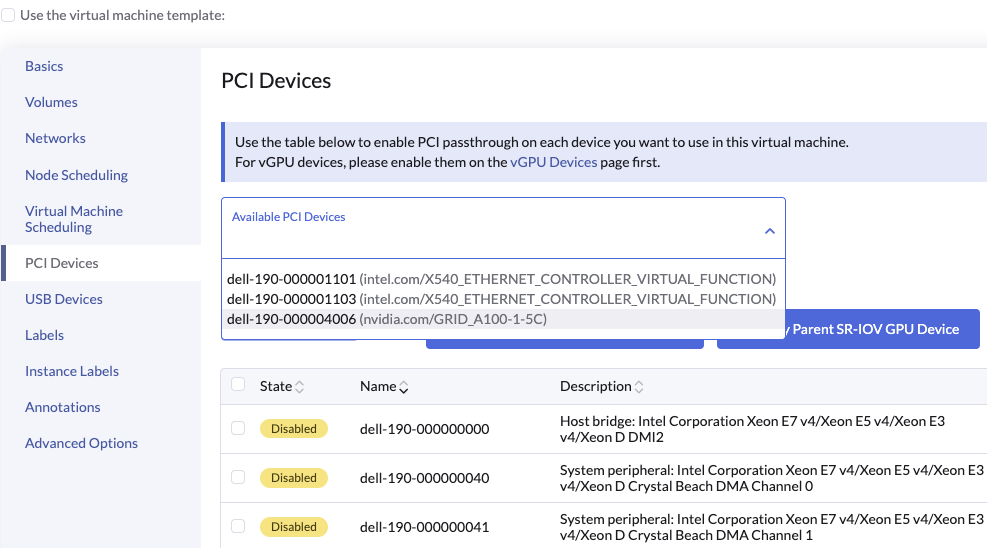
Which maps the vGPUDevice to the hostDevices section in the VM spec:
    spec:
      affinity: {}
      architecture: amd64
      domain:
        cpu:
          cores: 4
          maxSockets: 1
          sockets: 1
          threads: 1
        devices:
          disks:
          - bootOrder: 1
            disk:
              bus: virtio
            name: disk-0
          - disk:
              bus: virtio
            name: cloudinitdisk
          hostDevices:
          - deviceName: nvidia.com/GRID_A100-1-5C
            name: dell-190-000004006
From here onwards the normal pcidevice passthrough workflow follows and VM boots with vGPU device available to the guest workloads.
Related Articles
Jan 21st, 2025
Systems Management with SUSE Linux Enterprise Server 16